Step 1 — Load Accounts
Open the File menu and click Load accounts from file or clipboard.
- Formats supported:
username:passwordone account per line.
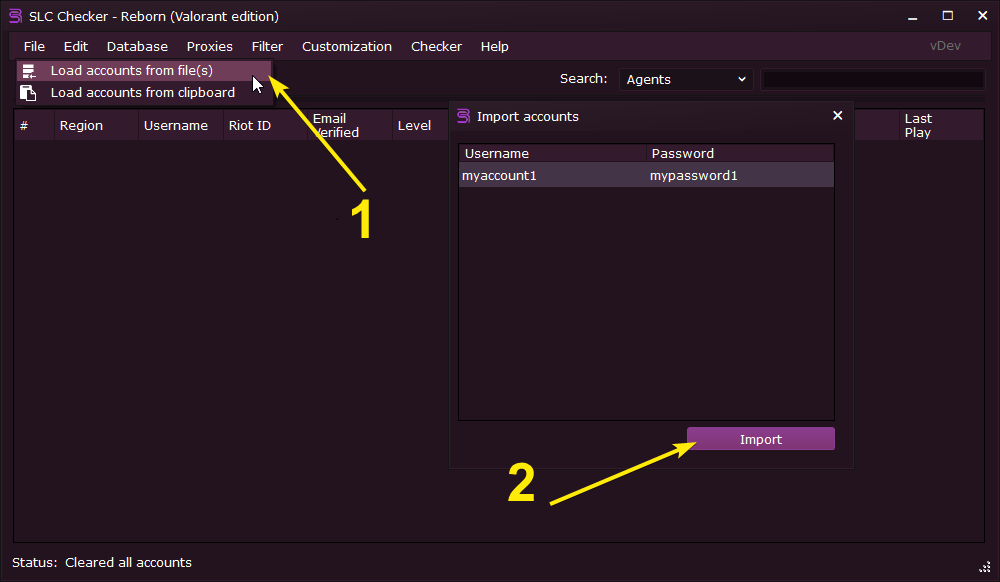 File → Load accounts from file or clipboard → Preview the accounts → Click "Import"
Step 2 — Load Proxies
Go to the Proxies menu and click Configuration. Add HTTP/S or Socks4/5 proxies.
- Formats:
host:portorhost:port:username:password - Prefer residential or ISP proxies for best results
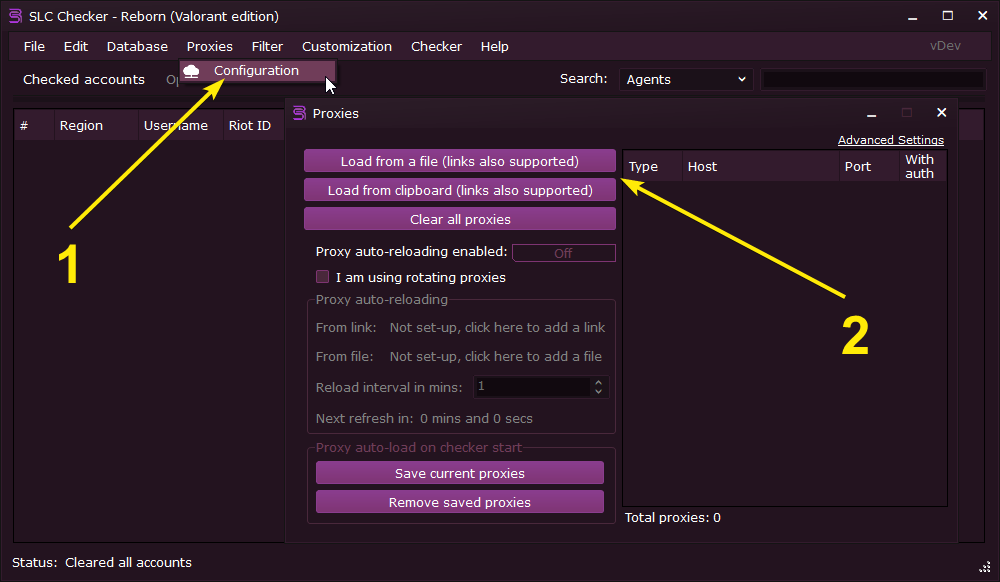 Proxies → Configuration → Load proxies from file or clipboard → Preview the proxies → Click "Import"
Step 3 — Set Captcha Solver
Open Checker → Settings → Set captcha service. Choose your provider and paste the API key.
- Supports multiple providers; select the one you use
- Click Set and validate to verify the key works before continuing
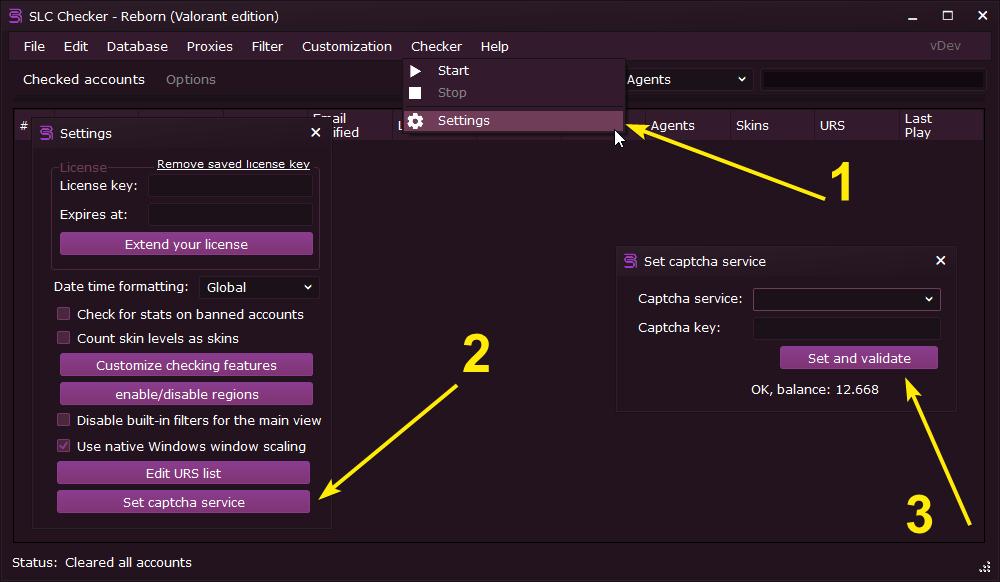 Checker → Settings → Set captcha service → Provider selection and API key
Step 4 — Start Checking
From the Options tab, select the desired workers count (use 10-15 at the start if you are unsure), then press go to Checker → Start.
- Rechecks skip captcha when sessions are cached
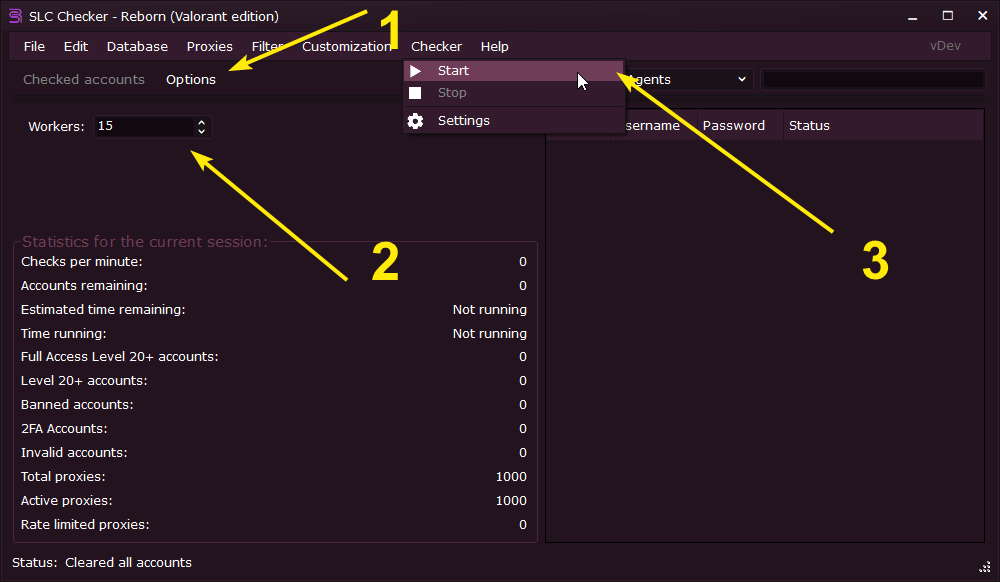 Checker - live progress
Step 5 — Import / Export Accounts to SLC-R Database
Use the integrated database to save your accounts and to later load them back into the program. You can also export the accounts to various other formats such as JSON, CSV, custom text files.
- Database → Export database: Export the current accounts to a SLC-R database file.
- Database → Load database: Import accounts from a SLC-R database file
- Other options: Right click on the main view → Export → All or selected only → Choose the format you want to export to (JSON, CSV, custom text files)
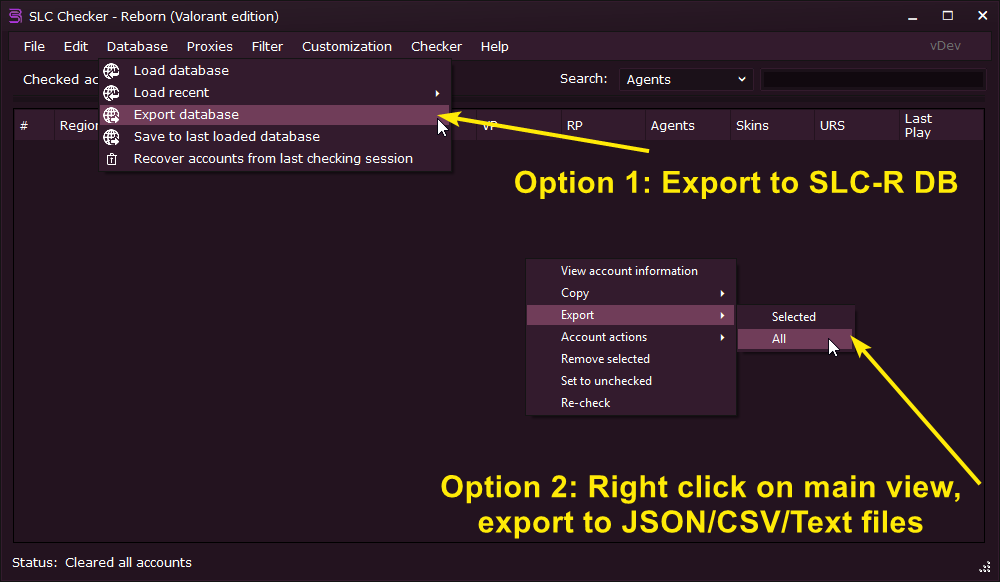 Database - various import/export options
Features
SLC Checker Reborn can currently gather the following information about an account:
Riot
- Riot ID
- Email verification status
- Phone verification status
- Account creation date
- Account creation country
- Last password change date
- Account ban status reason and banned until date
Valorant
- Temporary ban status banned until penalty games remaining penalty mins to wait
- Ranked eligibility
- VALORANT Points
- Radianite Points
- Level
- Last game date
- Current rank season and act
- Peak rank season episode and act
- Previous rank
- Wins and losses this season
- Agents owned
- Weapons with edition
- Weapon skins
- Weapon chromas
- Knives with edition
- Knife skins
- Knife chromas
- Gunbuddies
- Sprays
- Player cards
- Player titles
Exports
SLC Checker Reborn gathers the following data fields and collections
Fields
- {index}
- {username}
- {password}
- {emailaddress}
- {riotid}
- {regionname}
- {friendlystatus}
- {emailverified}
- {phoneverified}
- {level}
- {valorantpoints}
- {radianitepoints}
- {kingdomcredits}
- {lolaccountlevel}
- {puuid}
- {accountcreationcountry}
- {checkedat}
- {accountcreatedat}
- {passwordchangedat}
- {lastgamedate}
- {banneduntil}
- {banreason}
- {penaltygamesremaining}
- {penaltyminstowait}
- {eligibleforratedplay}
- {hasleagueaccount}
- {agentscount}
- {weaponscount}
- {weaponschromascount}
- {knivescount}
- {kniveschromascount}
- {weaponsandknivescount}
- {weaponsandkniveswithchromascount}
- {urscount}
- {gunbuddiescount}
- {sprayscount}
- {playercardscount}
- {playertitlescount}
- {flexescount}
- {winscurrentrank}
- {lossescurrentrank}
- {winratecurrentrank}
- {gamescurrentrank}
- {winrate}
- {games}
- {wins}
- {rankname}
- {seasonname}
- {displayname}
- {isurs}
- {isdeluxe}
- {isselect}
- {ispremium}
- {isexclusive}
- {isultra}
- {islevel}
Collections
- {agents}
- {weapons}
- {weaponschromas}
- {weaponsandknives}
- {weaponsandkniveswithchromas}
- {knives}
- {kniveschromas}
- {gunbuddies}
- {sprays}
- {playertitles}
- {playercards}
- {flexes}
- {ranks}
- {urslist}
Recommended Resedential Proxys
You must use resedential proxys Datacenter proxys will be blocked by Riot
Recommended Captcha Provider
- #1 Register an account @ NOCAPTCHA.IO, Verify your email, Sign in
- #2 Visit NOCAPTCHA.IO's riot terms. Accept the agreement.
- #3 Visit your accounts user control panel, copy your accounts DEV ID, and API KEY
- #4 Load funds into the site (I believe they require you to use at least 6000 credits per day to maintain access)
- #5 Visit SLC-R, go to CHECKER > SETTINGS > CAPTCHA SETTINGS > CLICK NOCAPTCHA
- #6 Fill in your DEVID & APIKEY in format DEVID:APIKEY
- #7 If you see your accounts balance it worked!
- TIP: Your proxys must contain a COUNTRY CODE in either the username or password! proxys must be sticky!
NET 7.0 is required


You're Ready
If you need help with anything else or if you have any questions, join our discord server here.